Molecular modelling of crystal structures -- part 0
getting started
First, get an account on one of the spare Silicon Graphics machines of the
Solid State Chemistry department -- if you do not already have one.
Secondly, you will need an account at the CMBI, who provide access to the
two databases wo will use.
I you already have an account there, that is fine. If not,
- Use the special account that is available for this course. Ask your
assistent for the username and password.
or
- Fill in the
form
at the cmbi web site, and choose the cheminformatics package.
You should now get an email stating your username and password at the cmbi
soon, but unfortunately "soon" can in practice mean "in a few weeks".
Let's go back to your local account. In a terminal window, type "alias c42",
and hit Enter. If you now get a line similar to
(/home/msi/cerius2_4.6/bin/cerius2 -nobanner> /dev/tty/) >& c2.err
then things are set up properly. If you get nothing, edit your .cshrc file
(e.g. using nedit), and add the line:
alias c42 '(/home/msi/cerius2_4.6/bin/cerius2 -nobanner> /dev/tty/) >& c2.err'
Remember to include the quotes.
You can now start Cerius2 by typing
c42
at the prompt (re-read .cshrc if you just changed it, by typing
source ~/.cshrc). This will
start Cerius2, and after a few seconds you should get the following
screen:
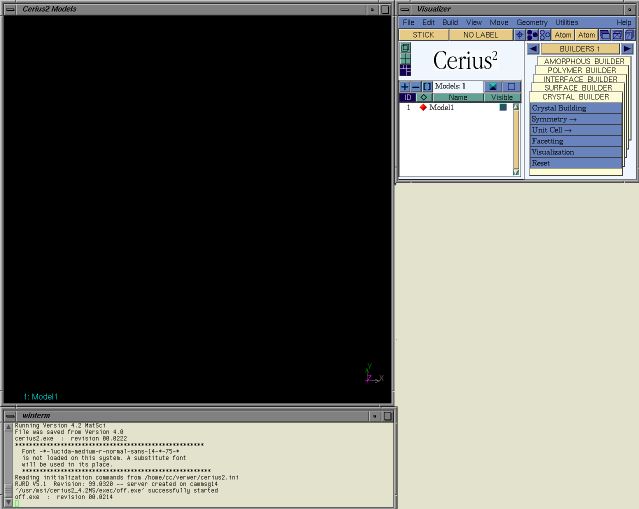
It consists of a Model window on the left, a visualizer window
on the right, and the original terminal window at the bottom. Click on
Help | Getting started... in the top right of the visualizer window
to work throught the five tutorials that will show you how to find your
way through the program. After going through those, you will be able to
* load and save models
* make new models and edit existing ones
* 'clean up' models you sketched or loaded from other sources
* select specific parts of a model
* move around (part of) a model
and many more things...
Once you have done all this, get back to the
main course page. main course page.